Lay Out Your Orchard
Areas, trees, and care that schedules itself
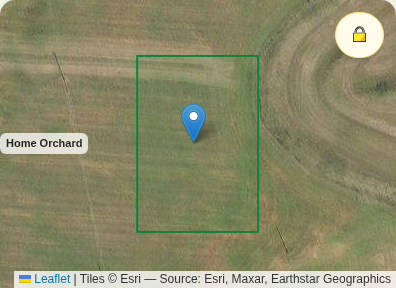
Put every tree on the satellite map, and the app takes it from there: it knows peaches want a dormant prune in February and blueberries want an acid feed in spring, and it builds those schedules for you.
Drawing areas, pinning trees on the map, and the care schedules below are Plus — every new farm gets a free 30-day trial, no card needed.
Areas and trees
- 1Open Orchard Map (More menu → or the home grid). The map opens on your land.
- 2Tap ✏️ Draw area and tap the corners of your orchard block; name it.
- 3Tap 🌳 Add tree, then tap the tree's spot on the map. Pick the species from the list — varieties, spacing and harvest timing come with it.
Care that schedules itself
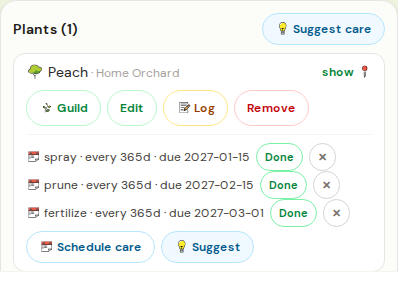
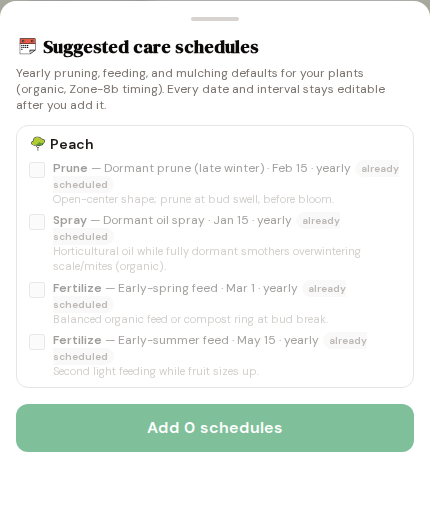
- 1Tap 💡 Suggest care above the plant list.
- 2The app proposes each tree's year: dormant prune, spring feed, dormant-oil spray — organic, timed for your region, pre-checked.
- 3Tap Add schedules. They're yours to edit; each one reminds you when it's due.
Due care shows in the 🔔 Coming up feed with your upcoming harvests — tap + Task to push a job to your task list. Mark care done and the next occurrence schedules itself.